
Ticket Client Company and Invoice Amount Hook

Purpose
This small WHMCS admin hook adds useful client context directly to the admin ticket view.
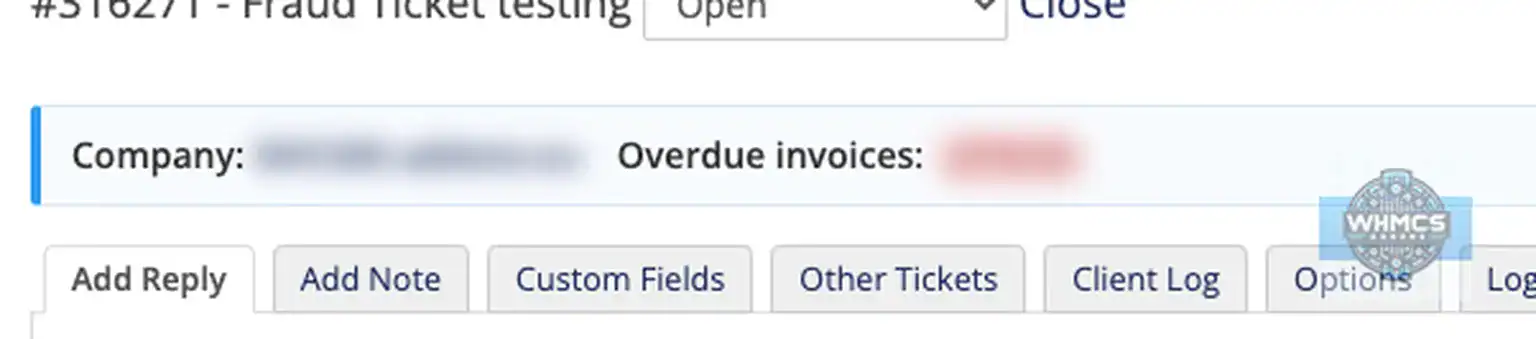
When an admin opens a linked support ticket, the hook shows the client’s company name between the ticket title and the default ticket tabs. It can also show either the client’s current unpaid invoice amount or overdue invoice amount, depending on the option you choose in the hook file.
It is built for WHMCS admins and support teams who want a quick reminder of the client’s account status while replying to tickets.
Features
- Shows the linked client’s company name on the WHMCS admin ticket view
- Falls back to the client name if no company name is set
- Can show the current unpaid invoice amount
- Can show only the overdue invoice amount instead
- Simple hook option to choose between unpaid and overdue amount mode
- Uses an orange amount bubble for unpaid amounts
- Uses a light red amount bubble for overdue amounts
- Shows nothing when the ticket is not linked to a client account
- Does not change tickets, invoices, clients, templates or permissions
- Does not notify the client automatically, so admins can decide how and when to mention payment matters
- Admin-side only
- No database tables
- No cron job
- No template edits
- Lightweight and easy to install
Compatibility
Version compatibility:
WHMCS v9.x
WHMCS v8.x
WHMCS v7.x
This hook is admin-side only. It adds a small display block to the WHMCS admin ticket view and does not change the client area. It should be template independent for the client area, but the exact admin placement depends on the standard WHMCS admin ticket view hook output area.
Requirements
Template support:
No client-area template changes are needed. The hook displays information only in the WHMCS admin ticket vie
Ioncube:
Not needed.
PHP version:
PHP 7.4, 8.1, 8.2, 8.3 or 8.4, depending on the supported PHP version for your WHMCS installation.
Cron:
No cron job is needed.
External access:
External access is used for IP country lookup when IP country flags are shown. Results are cached to reduce repeated lookups and keep the page fast.
Permissions:
The admin user needs permission to access the addon. To use the Ban action, the admin should also have permission to manage WHMCS banned IPs.
Support
For support contact us at addonhelp@whmcs-addons.eu
Please include your WHMCS version, PHP version, addon version and a short description of what happened. If the issue relates to syncing, include the relevant log entry where possible.
We also develop WHMCS modules. WHMCS-addons.eu is not responsible for issues caused by servers that do not meet the minimum requirements or by customised WHMCS installations that change normal addon behaviour. Always create a backup before installing or upgrading any addon.
All our pre-made Addons are only sold through
resellers, like R the Company.
