
Client Log
Purpose
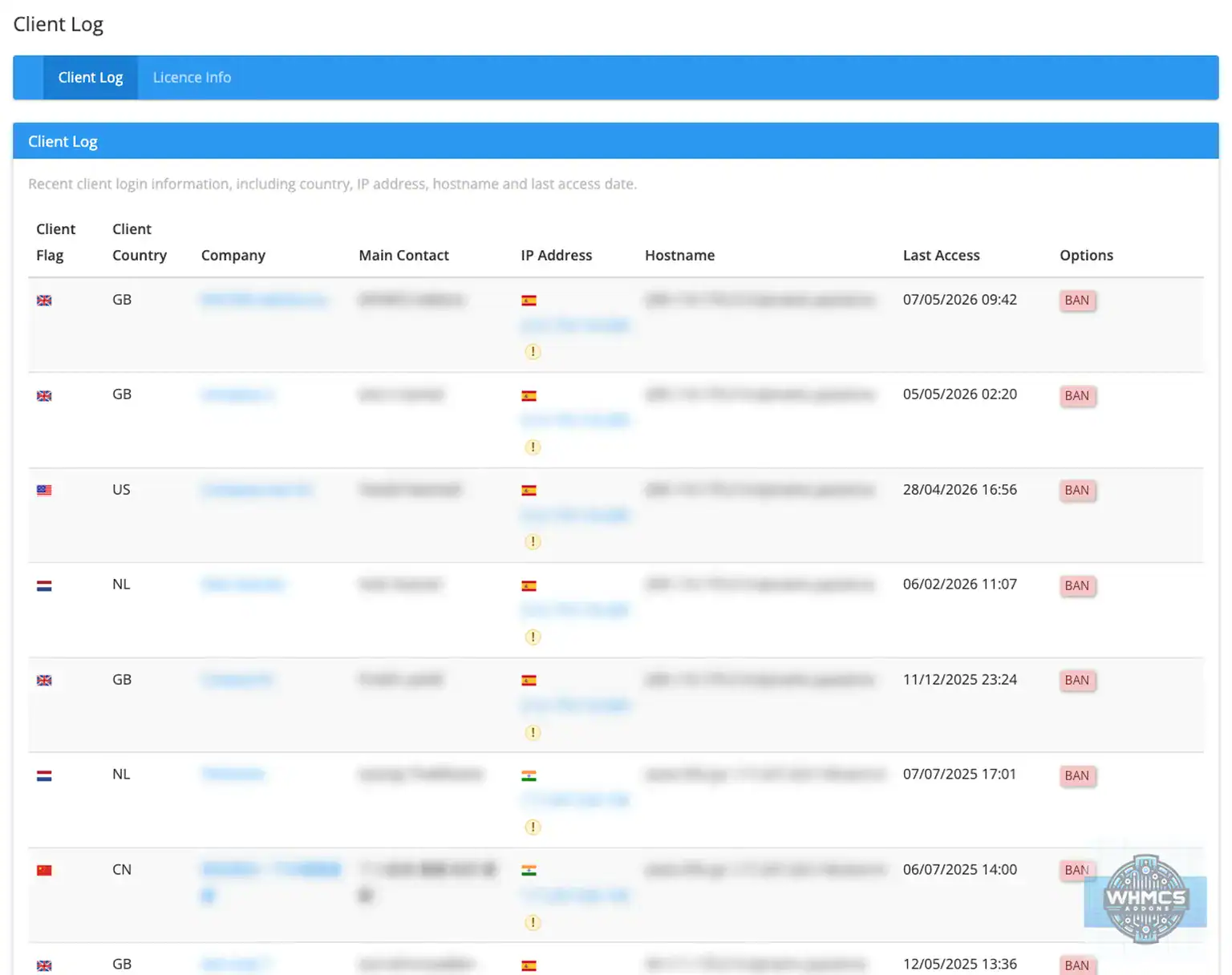
Client Log gives WHMCS admins a clearer view of recent client login activity. It shows useful login details such as the client, country, IP address, hostname and last access date, so unusual access patterns are easier to spot.
It also lets an admin ban a suspicious IP address directly from the Client Log screen, without opening WHMCS’ Banned IPs page and entering the details manually.
This addon is for WHMCS admins who want a faster and clearer way to review client access activity and act on suspicious logins.
Features
- View recent client login activity from one clean WHMCS admin page.
- Shows client company, main contact, client country, IP address, hostname and last access date.
- Displays the client account country flag.
- Displays a separate IP country flag before the IP address.
- Highlights when the client country and IP country do not match, so admins can spot unusual access more easily.
- Caches IP country checks to keep the page fast.
- Only checks IP country and banned status for the entries shown on the current page.
- Ban an IP directly from the Client Log page.
- Uses WHMCS’ real Banned IPs list, so the status shown is based on actual WHMCS ban records.
- Shows Banned only when the IP is actually active in WHMCS Banned IPs.
- Avoids duplicate ban entries for the same IP.
- Adds a useful ban reason, including client ID, admin, date and time.
- Supports a no-reload Ban action where available, with normal page-submit fallback for compatibility.
- Uses a softer red style for Ban and Banned labels, so the page is easier to read.
- Includes a Licence Info page with clear licence status and refresh option.
- Keeps the licence key in a separate licence file, so it is not managed from the WHMCS addon activation page.
- Clean WHMCS admin layout using the agreed WHMCS-addons.eu style.
- Does not delete, overwrite or change client records.
- Does not mark an IP as banned unless WHMCS itself confirms the IP is banned.
- No cron required.
Compatibility
Version compatibility:
WHMCS v9.x
WHMCS v8.x
WHMCS v7.x
Client Log is an admin-side addon. It does not change the WHMCS client area and does not require template edits.
Requirements
Template support:
No client-area template changes are needed. The addon works from the WHMCS admin area.
Ioncube:
IonCube Loader version 13 or newer.
PHP version:
PHP 7.4, 8.1, 8.2, 8.3 or 8.4, depending on the supported PHP version for your WHMCS installation.
Cron:
No cron job is needed.
External access:
External access is used for IP country lookup when IP country flags are shown. Results are cached to reduce repeated lookups and keep the page fast.
Permissions:
The admin user needs permission to access the addon. To use the Ban action, the admin should also have permission to manage WHMCS banned IPs.
Support
For support contact us at addonhelp@whmcs-addons.eu
Please include your WHMCS version, PHP version, addon version and a short description of what happened. If the issue relates to syncing, include the relevant log entry where possible.
We also develop WHMCS modules. WHMCS-addons.eu is not responsible for issues caused by servers that do not meet the minimum requirements or by customised WHMCS installations that change normal addon behaviour. Always create a backup before installing or upgrading any addon.
All our pre-made Addons are only sold through
resellers, like R the Company.
